Showing posts with label chronic devteam. Show all posts

Wednesday, May 30, 2012

Rocky Racoon Untether Updated to Support iPad 2,4


The Chronic Dev-Team has released an update to the Rocky Racoon Untether package that supports the new iPad 2,4.

This package will allow your 5.1.1 device to reboot without requiring an external tool such as redsn0w.

As there are now two versions of iOS both called "5.1.1" for iPhone 4 GSM, 1.0-2 was released to support both.

Apple released a new iPad 2 WiFi, a unique piece of hardware that was difficult to find, now support in 1.0-3

You can install the Rocky Racoon 5.1.1 Untether package from Cydia to untether a device previously jailbroken with RedSn0w instead of using Absinthe.


*thanks iclarified*

Send us a story or tip @ TipsForLimerain.com@gmail.com and follow our pages for the latest limera1n, rubyra1n, and all tech stories, follow us on Twitter at @iphonepixelpost or @limerain_com
And like our Facebook page www.iPodSets.com
- Posted using my iPhone 4

Friday, May 25, 2012

Rocky Racoon Package Untethers Your Previously Tethered Jailbreak


The Chronic Dev-Team has released Rocky Racoon 5.1.1, a package in Cydia that will untether your device if it is currently running a tethered jailbreak of iOS 5.1.1.

Rocky Racoon is the underlying untethered exploit that will be installed by popular jailbreak tools such as redsn0w and absinthe... if you are using 5.1.1 and you can reboot your device and have it still be jailbroken, you have Rocky Racoon.

If you device relies on Rocky Racoon for untethering, which includes nay iPad 2, iPad 3, or iPhone 4S running 5.1.1., uninstalling this package will unjailbreak your device.

You can install Rocky Racoon from the System section in Cydia.


*thanks iclarified*

Send us a story or tip @ TipsForLimerain.com@gmail.com and follow our pages for the latest limera1n, rubyra1n, and all tech stories, follow us on Twitter at @iphonepixelpost or @limerain_com
And like our Facebook page www.iPodSets.com
- Posted using my iPhone 4

Tuesday, December 20, 2011

Pod2g Resolves Cache Troubles With the iPhone 4S Untethered Jailbreak


Pod2g has resolved the cache troubles with the iPhone 4S untethered jailbreak, according to a new progress update.

---
OK, figured it out, the A5 cache is not a problem anymore. I sorted it out by doing the untether in a single thread and by flushing all the dcache then all the icache in a row at a strategical point of the process. It took me like a hundred of tests to find the key. Hard for the nerves.

For the tech guys, here is a link explaining issues related to self modifying code ( or code patching ) on the ARM platform : http://blogs.arm.com/software-enablemen ... ying-code/

Another news : I discussed with @saurik today about the launchd boot process, and he's found one missing piece of the puzzle I needed to have a perfectly stable jailbreak. He's definitly one of the best iOS gurus out there. Thank you saurik!
---

Things are definitely progressing. We'll let you know when we have more news via @limerain_com, Facebook page , and RSS.


*thanks iclarified*

Send us a story or tip @ TipsForLimerain.com@gmail.com and follow our pages for the latest limera1n, rubyra1n, and all tech stories, follow us on Twitter at @iphonepixelpost or @limerain_com
And like our Facebook page www.iPodSets.com
- Posted using my iPhone 4

Monday, December 19, 2011

Update on the Untethered Jailbreak for the iPhone 4S


Pod2g has issued an update on the progress of the untethered jailbreak for the iPhone 4S.

For those who haven't been tracking his progress, last week pod2g successfully untethered the iPhone 4, iPhone 3GS, iPod 4G, iPod 3G, iPad 1, and Apple TV 2 (4.4.3). He has now turned his attention to the iPhone 4S and the iPad 2.

Here are the news of the 4S week-end. The untether fails right now because I'm having processor cache issues. I'm close, but I can't figure out what happens. It certainly has something to do with the Cortex-A9 cache management.

I could sort it out quick, it's a matter of chance. I'll report you my progress tomorrow.

As usual we will keep you up to date with the latest. You can follow Us via @limerain_com, Facebook page , or RSS.


*thanks iclarified*

Send us a story or tip @ TipsForLimerain.com@gmail.com and follow our pages for the latest limera1n, rubyra1n, and all tech stories, follow us on Twitter at @iphonepixelpost or @limerain_com
And like our Facebook page www.iPodSets.com
- Posted using my iPhone 4

Thursday, December 15, 2011

Progress Report on the iOS 5.0.1 Untethered Jailbreak


Pod2g has issued a new progress report on the iOS 5.0.1 untethered jailbreak in which he reveals that the jailbreak for old devices is being packaged for release.

Thanks to donators, pod2g has received enough financial support to purchase an iPhone 4S and iPad 2 and will soon start working on the jailbreak for those devices.

---
Hello my friends,I know that I've been silent yesterday and that it was annoying.

Sorry for this, but I had to organize things for the release.
Also, I've tested iPad 1 and it worked.
Today I hope I can test a 3Gs.

BTW: please don't propose to be a beta tester because I'm too paranoid, fearing leaks.

Now the time to finalize the jailbreak for old devices, fix some stability issues and package the whole.That will take some days.

In the meanwhile, I'm starting the research for iPad 2 and 4S.I'll take you informed of my progress.

Finally, I want to thank all who donated. I now can buy both devices! I don't know what to say.

Thank you very much my friends.
---

Stay tuned to Limerain on @limerain_com, Facebook page , or RSS for news on when the jailbreak will be released.


Early iOS 5.0 Demo Video

*thanks iclarified*

Send us a story or tip @ TipsForLimerain.com@gmail.com and follow our pages for the latest limera1n, rubyra1n, and all tech stories, follow us on Twitter at @iphonepixelpost or @limerain_com
And like our Facebook page www.iPodSets.com
- Posted using my iPhone 4

Friday, February 18, 2011

Greenpois0n RC6.1 Released With iBooks, ATV2 Fix


The Chronic Dev-Team has released a minor update to Greenpois0n that brings a fix for iBooks and the Apple TV 2G Wi-Fi bug, according to OPK.

updated #greenpois0n builds for win and mac (RC6.1) are now live, these include the ibooks fix

a fix for the atv2 wifi bug has been made

You can download the latest release from here. It can be run on top of earlier builds.

To jailbreak follow one of these tutorials:
● iPhone (Windows)
● iPod Touch (Windows)
● iPad (Windows)

● iPhone (Mac)
● iPod Touch (Mac)
● iPad (Mac)
● Apple TV 2G (Mac)


*thanks iclarified*

Our new Forum is now open here or on the top tabs marks Forums, please register and post..

For the latest limera1n, rubyra1n, and all tech stories, follow us on Twitter at
@iphonepixelpost or @limerain_com
www.iPodSets.com
- Posted using my iPhone 4

Monday, February 7, 2011

Jailbreak for Verizon iPhone 4 Confirmed Released


The Chronic Dev-Team has been successful in jailbreaking the Verizon iPhone 4 on iOS 4.2.6 with Greenpois0n.

pod2g: Hey, @Lunch8ox tested RC5.4. Works well on Verizon. :-) Thanks for the testing mate.

The team is expected to add support for the Verizon iPhone in the next RC of Greenpois0n. We will let you know when it becomes available.

Update:
Greenpois0n RC 5.4 has been released with support for the Verizon iPhone 4. You can get it here
And follow our tutorial for greenpois0n here


*thanks iclarified*

Our new Forum is now open here or on the top tabs marks Forums, please register and post..

For the latest limera1n, rubyra1n, and all tech stories, follow us on Twitter at
@iphonepixelpost or @limerain_com
www.iPodSets.com
- Posted using my iPhone 4

Chronic Dev-Team is Adding Apple TV Support to Greenpois0n Rc6


The Chronic Dev-Team has begun work on adding Apple TV support to Greenpois0n.

starting on rc6 now, including appletv support!! @nitotv has already done most of the work for us. he's awesome!!!

We'll let you know when rc6 is available and post a tutorial for jailbreaking your Apple TV as well.

You can find a list of our current Greenpois0n tutorials here.


*thanks iclarified*

Our new Forum is now open here or on the top tabs marks Forums, please register and post..

For the latest limera1n, rubyra1n, and all tech stories, follow us on Twitter at
@iphonepixelpost or @limerain_com
www.iPodSets.com
- Posted using my iPhone 4

Saturday, February 5, 2011

iPhone | How to Jailbreak Your iPhone 3GS, iPhone 4, iPad, iPod Touch Using Greenpois0n (Windows)


These are instructions on how to jailbreak your iPhone 3GS and iPhone 4 using Greenpois0n for Windows. Greenpois0n supports the iOS 4.1 and iOS 4.2.1 firmware. Use Limera1n if you want to jailbreak iOS 4.0, iOS 4.0.1, iOS 4.0.2.

Remember: Do not update to iOS 4.2.1 if you need the unlock. Ultrasn0w does not support that baseband yet. The only exception is the iPhone 4. You can update to iOS 4.2.1 without upgrading your baseband by following this tutorial.

Step One
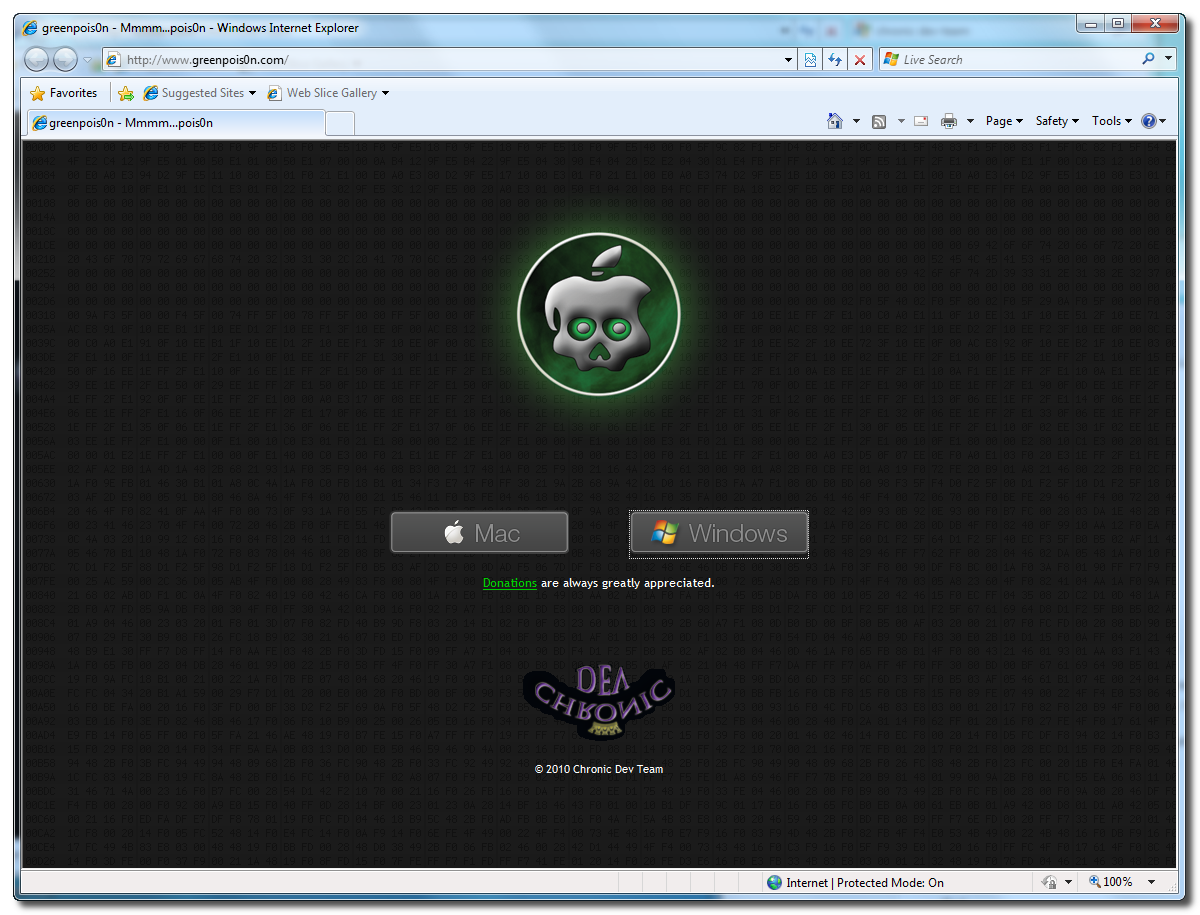
Open your web browser of choice and navigate to http://www.greenpois0n.com. Click theWindows link at the bottom of the screen.


Step Two
When prompted save the download to your desktop


Step Three
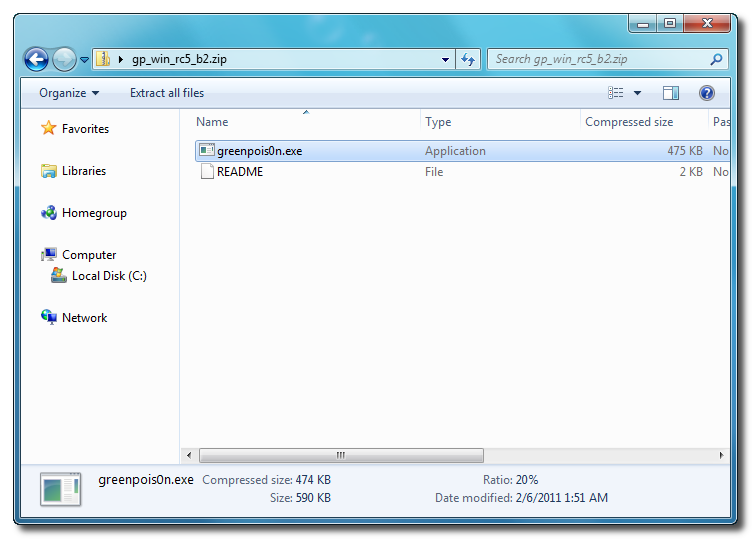
Double click the downloaded gp_win_rc5_b2.zip file then drag the greenpois0n.exe file to the desktop. Double greenpois0n.exe from the desktop to launch the application


Step Four
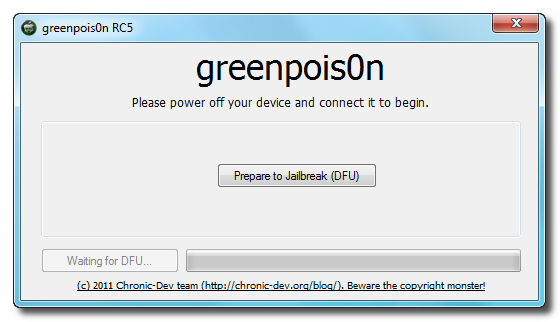
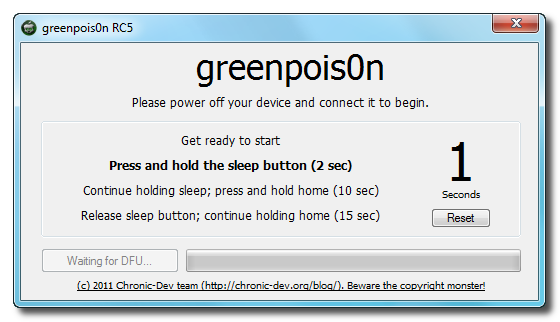
Power off your iPhone then click the large Prepare to Jailbreak (DFU) button


Step Five
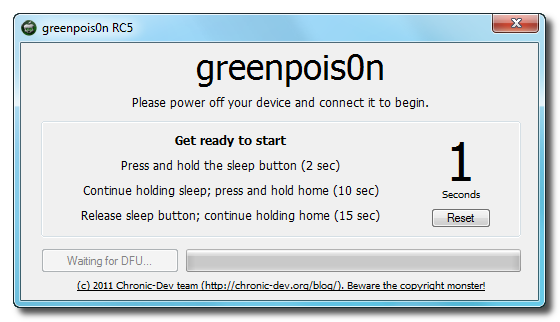
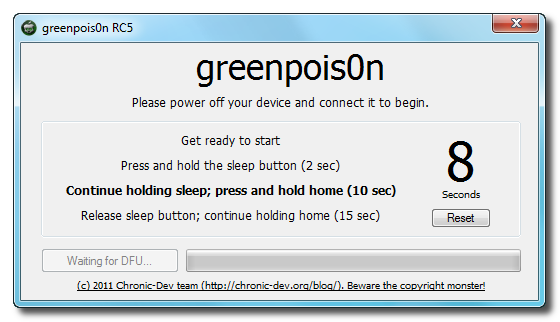
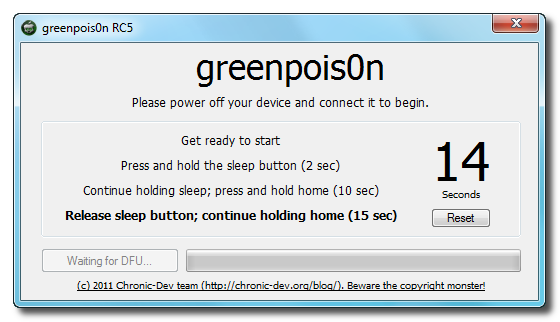
You will now be instructed on how to place your iPhone into DFU mode. You can get help with thishere.


You will be asked to press and hold the sleep button for 2 seconds.


Continue holding sleep; press and hold home for 10 seconds.


Release sleep button; continue holding home for 15 seconds.


Step Six
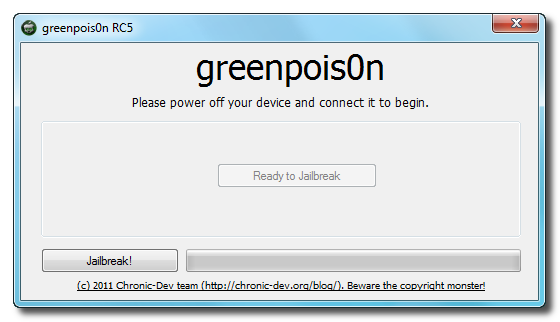
Once your iPhone is successfully in DFU mode you may click the Jailbreak button.


Step Seven
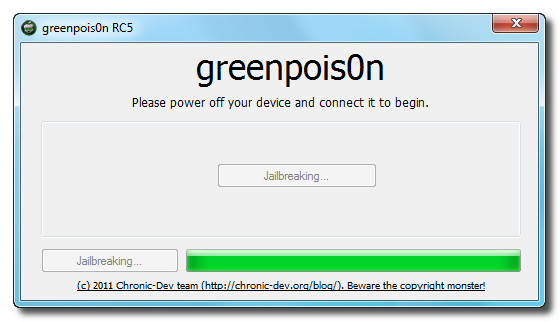
Greenpois0n will now jailbreak your device


Step Eight
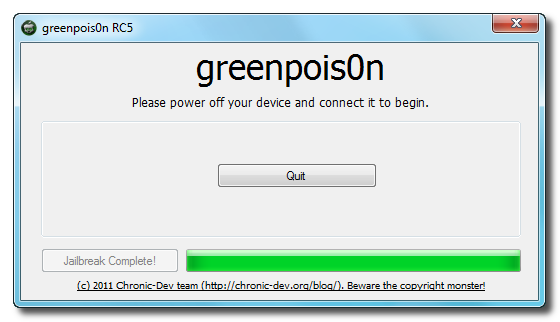
Click the Quit button once the software application has completed.


You'll notice some verbose mode text scrolling on your device.

Step Nine
After the iPhone restarts you'll notice a new Loader application on your Springboard. Press to launch it.


Step Ten
Press to select Cydia then press the large Install Cydia button that appears.


Step Eleven
Once Cydia has installed successfully you can remove Loader by pressing the Options button then the large red Remove Loader.app button.


Step Twelve
Restart your iPhone then run Cydia. Let it do all the necessary updates then follow our Unlocktutorial if possible for your device.


***A big thanks goes everyone who made this jailbreak possible.Our new Forum is now open
thanks iclarified
here or on the top tabs marks Forums, please register and post..  For the latest limera1n, rubyra1n, and all tech stories, follow us on Twitter at @iphonepixelpost or @limerain_com www.iPodSets.com - Posted using my iPhone 4


Windows version of Greenpois0n is Live!


Greenpois0n windows version is now live on greenpois0n.com.
Tutorial will come soon...
Enjoy and your heard it here First!


Our new Forum is now open here or on the top tabs marks Forums, please register and post..

For the latest limera1n, rubyra1n, and all tech stories, follow us on Twitter at
@iphonepixelpost or @limerain_com
www.iPodSets.com
- Posted using my iPhone 4

Thursday, February 3, 2011

HOW To Use GreenPois0n To get a Untethered Jailbreak for any iDevice iOS 4.2.1 [Mac]


 greenpois0n will Jailbreak your iDevice.

> Supported iDevices:

  - iPod Touch 2G (all bootroms)
  - iPod Touch 3G
  - iPod Touch 4G
  - iPad 1G
  - iPhone 3Gs (all bootroms)
  - iPhone 4
  - iPhone 4 Verizon (_not_tested_)
  - AppleTV 2


Chronic DevTeam just released the new greenpois0n update, which will allow us to apply an untethered jailbreak to our iOS devices running iOS 4.2.1 ( and iOS 4.1.1 ). At the moment, the tool is available only for mac users, but windows and probably linux support will come soon…


1. Download greenpois0n ( mirror download )

2. Restore your iOS device to iOS 4.2.1. Note: if you need to unlock do not do this. Restoring to a stock FW will upgrade your baseband and you will loose the ability to unlock – probably forever.

3. Connect your iPhone and load greenpois0n

4. Click on Jailbreka and follow the instructions on the screen to put your iOS in recovery mode

5. Once in recovery mode, an automated process will start and will jailbreak your device.

6. After the jailbreak is done, you will have a new application on your springboard called Loader. Use it to install Cydia, then it will ask you if you want to remove it. You can, or you can keep it for nostalgia. A quick re-spring, and you now have Cydia. You know what to do next.


7. Enjoy

The custom animated bootlogo is bulit in right now. To apply our own custom animated bootlogos we will need an additional Cydia application which is not available at the moment. We will keep you informed. Stay tuned…
*thanks FSM*

Download RedSn0w from here 

For all of those who are experiencing problems and or errors downloading and installing Cydia 
reboot your device once and then just open and reopen the loader until you see Cydia is there then download it, if you get errors while downloading its ok, just try again, it took us a enormous amount of tries until we finally got Cydia to download(we didn't have a computer present after we jailbroke the device or we could have used the next solution) we have learned from MuscleNerd that you can run redsn0w to install Cydia, redsn0w will not tether your device, it will just install Cydia, just make sure you deselect everything just install Cydia, and it works the other way around, if you already used redsn0w to jailbreak tethered then run Greenpois0n and it will untether your jailbreak.  


MuscleNerd "@pod2g (but those with tethered redsn0w JB can just go ahead and run GreenPois0n over it, since they don't interact in that setup)"


MuscleNerd "@pod2g yes those untethered via Monte gotta restore first for sure!  That's where RedSn0w and GreenPois0n do interact with each other."


 if you get an error just exit the app relaunch it twice and try again. or use Redsn0w


Our new Forum is now open here or on the top tabs marks Forums, please register and post..

For the latest limera1n, rubyra1n, and all tech stories, follow us on Twitter at
@iphonepixelpost or @limerain_com
www.iPodSets.com
- Posted using my iPhone 4

Chronic Dev-Team Releases Untethered Jailbreak for iOS 4.2.1


The Chronic Dev-Team has just released the latest version of Greenpois0n, which features an untethered jailbreak for iOS 4.2.1 without the need for SHSH blobs. The exploit they are using has already been patched in iOS 4.3.

Currently it is Mac only and is a beta release. A Windows version will be released "soon." You can download the jailbreak from here.

As always, we will have a tutorial posted very soon


*thanks iclarified*

Our new Forum is now open here or on the top tabs marks Forums, please register and post..

For the latest limera1n, rubyra1n, and all tech stories, follow us on Twitter at
@iphonepixelpost or @limerain_com
www.iPodSets.com
- Posted using my iPhone 4

Friday, January 21, 2011

Chronic Dev-Team Announces Untether for iOS 4.2.1 Jailbreak


The Chronic Dev-Team has announced an untether for the iOS 4.2.1 jailbreak.

The untether is demoed in the video below. It's a result of a collaboration between @0naj, @p0sixninja, and @pod2g. P0sixninja has previously said it will not require iOS 4.2b3 SHSH blobs.

Pod2g notes that a small bug remains where the wifi icon doesn't show up. Once fixed they will package the untether for release.

Stay tuned for further details...


*thanks iclarified*

Our new Forum is now open here or on the top tabs marks Forums, please register and post..

For the latest limera1n, rubyra1n, and all tech stories, follow us on Twitter at
@iphonepixelpost or @limerain_com
www.iPodSets.com
- Posted using my iPhone 4

Monday, January 10, 2011

Chronic Dev-Team is Working on Their Own Untether for iOS 4.2.1 Jailbreak


The Chronic Dev-Team is working on their own untether for the iOS 4.2.1 jailbreak that will not require iOS4.2b3 SHSH blobs, according to tweets made today by p0sixninja.

A lot of people are saying another tethered jailbreak is pointless, I agree. Focusing on getting untethered before release

@p0sixninja I assume you are talking about Greenpois0n? Are you implementing Musclenerd's untether or do you have your own?

@tahu363 we're implementing our own

@p0sixninja I'm assuming "your own" will require 4.2b3 shsh? And thanks for your guys work!

@Capsfanchad lol no

Currently, an untether is only available to who have their iOS 4.2b3 shsh blobs saved via RedSn0w for Mac. Comex is also working on his own untether which has yet to be released.


*thanks iclarified*

Our new Forum is now open here or on the top tabs marks Forums, please register and post..

For the latest limera1n, rubyra1n, and all tech stories, follow us on Twitter at
@iphonepixelpost or @limerain_com
www.iPodSets.com
- Posted using my iPhone 4