Sunday, April 3, 2011

How to Update Your iPhone 4 Without Upgrading the Baseband (Windows) 4.3.1


This tutorial will show you how to upgrade your iPhone 4 to iOS 4.3.1 without upgrading its baseband using TinyUmbrella for Windows.
Do this at own risk, this only lets you keep your unlock and will not jailbreak your device...


Please Note: This ONLY Works with the iPhone 4!


Step One
Download TinyUmbrella from here Also make sure to download the iPhone 4 iOS 4.3.1 which you can find here.


Step Two
Double click the downloaded TinyUmbrella.exe file. 

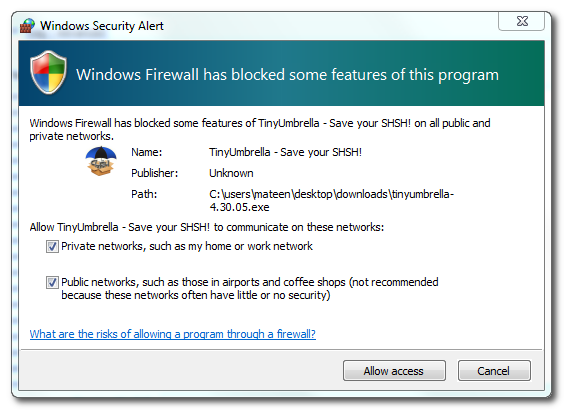
If you get a Windows Firewall notification, check both boxes and click Allow Access.

Step Three
Make sure the device is connected, and Umbrella has detected the type of device and its firmware.
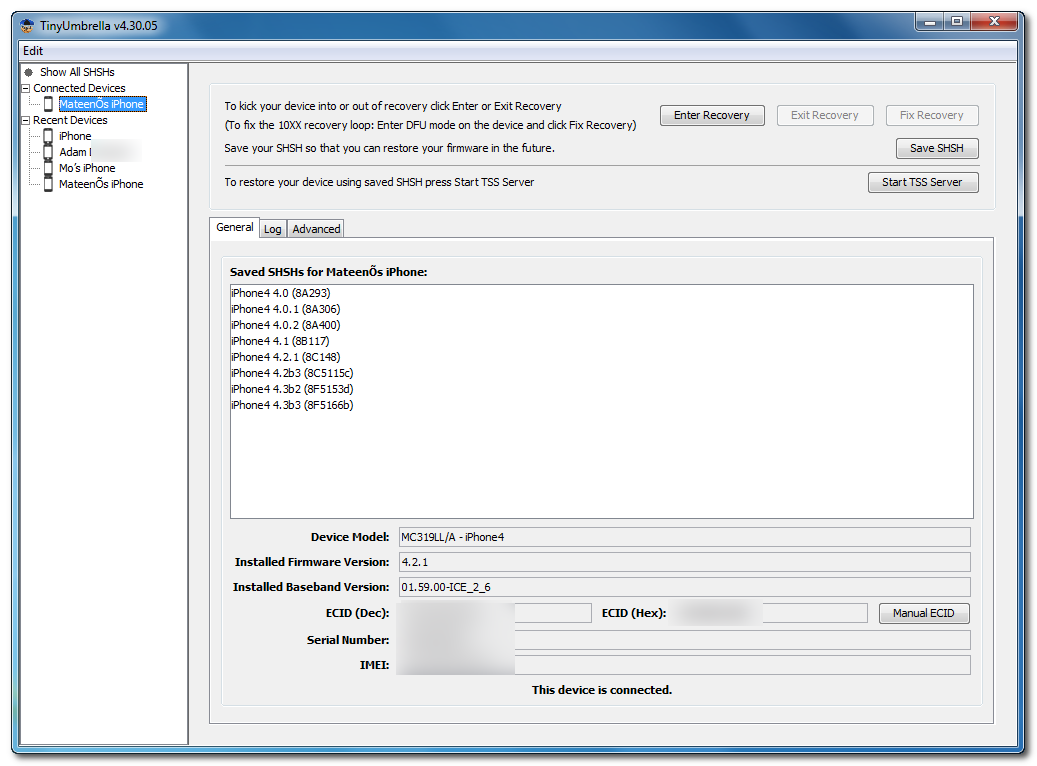

**If you haven't already saved your iOS 4.3.1 SHSH blobs then click Save SHSH. Make sure they successfully save before continuing.


Step Four
Hit Start TSS Server and make sure you receive no errors. 


Once The TSS Server is "running" successfully, umbrella will kill iTunes. Leave TinyUmbrella Open. You can double check to see if the TSS server is running under the Log tab.


If you do receive an error, DO NOT continue. Your restore will not work if the TSS server cannot be started. 

Step Five
Open iTunes by doubling clicking its icon.


Hold down the Shift key and click Restore


Select your iPhone 4.3.1 firmware file from the popup window that appears and click Open.
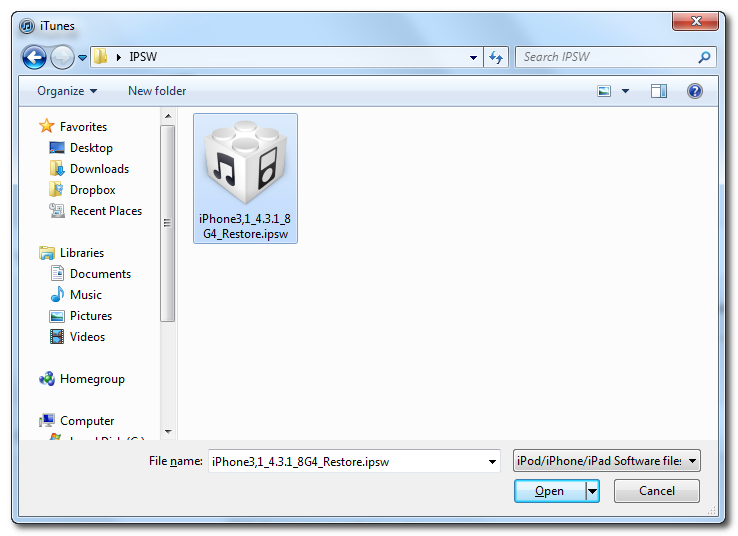

Click Restore to begin restoring your device.
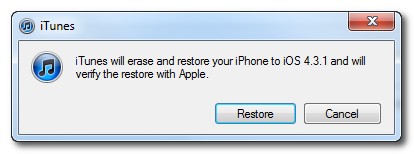

Step Six
iTunes should give you error 1013. This is what we wanted, as it notes the baseband has not updated :) Click Ok and close iTunes.
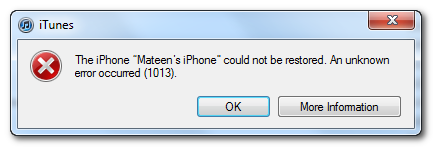

If you get a 16XX error then try entering DFU and go to step 5.
If your restore does NOT end in a 1013, it means your baseband was updated. This is likely because you did not have the TSS server running OR you updated without TinyUmbrella OR you are working with a device OTHER than iPhone 4.


Step Seven
Place your iPhone into DFU mode by holding down both the Power and Home buttons for ten seconds, then release the Power button and continue holding the Home button for another 5 seconds. You can find help with DFU mode here.

Step Eight
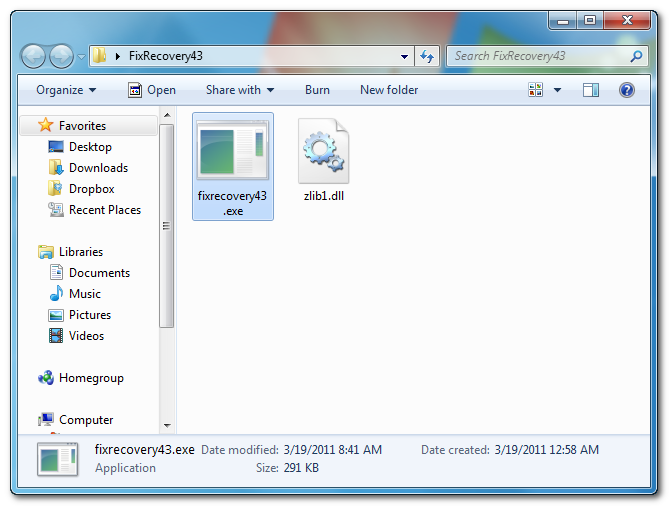
Fix Recovery in TinyUmbrella is currently not working. Download this standalone .exe file to fix recovery on 4.3.1. Extract the file and double click on fixrecovery43.exe. A command prompt will open, and the program will go through the process. During this time, you will notice scrolling text on your iPhone 4.

Step Nine
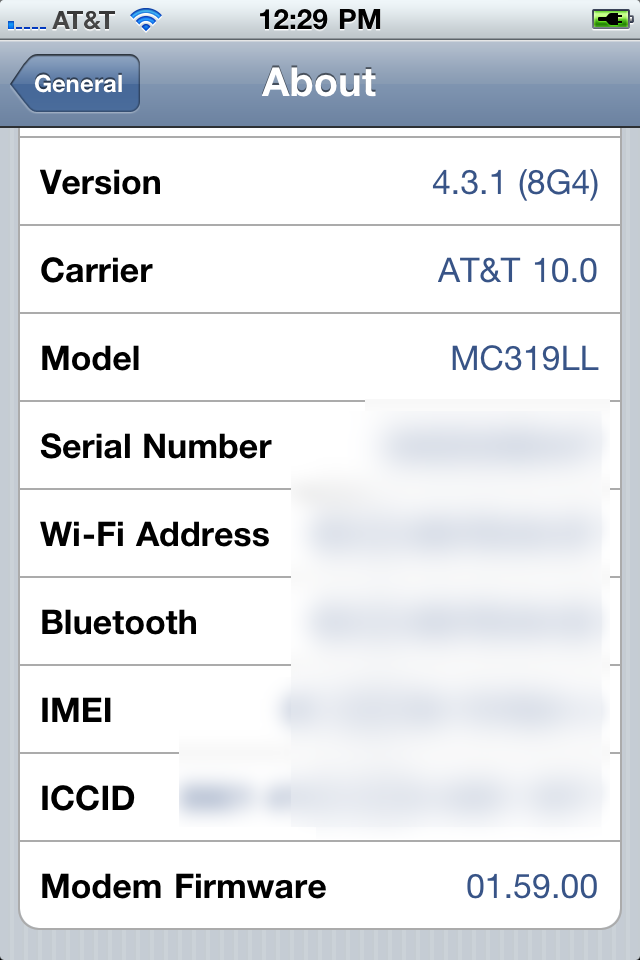
Your iPhone will now be on 4.3.1 with the 1.59.00 baseband! (Which means you can now unlock using this tutorial)


**Thanks to semaphore for his work on this tool


*thanks iclarified*

Our new Forum is now open here or on the top tabs marks Forums, please register and post.. For the latest limera1n, rubyra1n, and all tech stories, follow us on Twitter at @iphonepixelpost or @limerain_com www.iPodSets.com - Posted using my iPhone 4

Untethered Jailbreak is Coming Soon via RedSn0w and PwnageTool, No iPad2 Support


The iPhone Dev-Team has announced that they will release updated versions of both RedSn0w and PwnageTool to provide an untethered jailbreak for iOS 4.3.1.

Currently the team is working on overall 4.3.x jailbreak issues and getting Cydia ready for the release. I0n1c's untether has been tested and described as 'solid'.

The upcoming releases of RedSn0w and PwnageTool will support the Apple TV 2 but will not support the iPad 2. Musclenerd notes that they are waiting to find a legal method of distributing comex's 4.3 jailbreak for the iPad 2 before they make it public.

We will let you know as soon as the jailbreak becomes available.


*thanks iclarified*

Our new Forum is now open here or on the top tabs marks Forums, please register and post.. For the latest limera1n, rubyra1n, and all tech stories, follow us on Twitter at @iphonepixelpost or @limerain_com www.iPodSets.com
- Posted using my iPhone 4

Saturday, April 2, 2011

GarageBand Mac gets updated to pull in iPad projects


The 47MB update is available now through Software Update or via Apple’s site as a standalone installer.

From release notes:

This update improves overall stability and addresses a number of minor issues, including the following:• Support for opening projects imported from GarageBand for iPad. This update is recommended for all GarageBand ’11 users.


*thanks 9to5Mac*

Our new Forum is now open here or on the top tabs marks Forums, please register and post.. For the latest limera1n, rubyra1n, and all tech stories, follow us on Twitter at @iphonepixelpost or @limerain_com www.iPodSets.com
- Posted using my iPhone 4

12,000 iPad 2s sold on eBay in two weeks. Where did they go?


While we’re awaiting Apple’s conference call come April 20 that will shine the light on iPad 2 sales, eBay has just released their official figures relating to a two-week period of iPad 2 activity on their US site, between the launch and international roll out. CNET reports:

Unsurprisingly the hard-to-get tablet has been moving briskly on the service, reaching just less than 12,000 sales in the two-week period between the U.S. launch and the iPad 2′s launch in 25 additional international countries.
About 65 percent of devices went to US residents versus just 35 percent of the original iPads last year. Canada and Russia are the biggest importer of iPad 2s, eBay data suggests, with the latter commanding the highest average mark-up. The average selling price for the 16GB WiFi iPad 2 was $697 on the auctioning site (versus Apple’s retail price of $499), going all the way up to a $406 premium on the flagship 64GB 3G model. There’s more…


Reflecting the last year’s iPad sales structure, the low-end 16GB WiFi and the high-end 64GB 3G models have been the most popular on eBay. Check out the source link for more data, it’s an interesting food for though.


*thanks 9to5Mac*

Our new Forum is now open here or on the top tabs marks Forums, please register and post.. For the latest limera1n, rubyra1n, and all tech stories, follow us on Twitter at @iphonepixelpost or @limerain_com www.iPodSets.com
- Posted using my iPhone 4

Samsung rolling out Star Trek-like see-thru LCD panels


First samples of Samsung awesome new display panels have begun rolling out from assembly lines. These isn’t your pa’s display – the Korean consumer electronics maker has outdone itself by developing a new technology, pure Star Trek stuff. According to a press release, not only is the display itself transparent, it doesn’t require backlight because they’ve found a way to replace the traditional backlight with ambient light.

Given that traditional backlights consumer the vast majority of power in a traditional LCD, Samsung’s see-thru panels are tremendously power-savvy as well. The first panels coming out are of a 22-inch variety and sport a 1680-by-1050 pixel resolution with a 500:1 contrast ratio. From the press release:

The transparent LCD panel has a high transparency rate, which enables a person to look right through the panel like glass, and it consumes 90% less electricity compared with a conventional LCD panel using back light unit. It’s because a transparent LCD panel utilizes ambient light such as sun light, which consequently reduces the dependency on electricity for generating power.
More awesomeness, including additional images and video, right below the fold.


Apple has a multi-year contract with Samsung for flat panels and they are known for using the latest tech when it makes sense, like Thunderbolt connection. That said, a next-gen MacBook with a nice frameless display seems logical.

Hold your horses, Samsung for now expects to see the new display tech used by fancy advertising agencies and in boardrooms, for teleconferencing. Besides, transparent display makes little sense in everyday computing, even if the bottom clip showing a 14-inch transparent OLED display notebook is telling us otherwise.

Samsung pledged to hire 300 engineers in the first six months of 2011, which is part of the planned expansion of their Austin, Texas semiconductor plant worth $3.6 billion dollars, EETimes reported today. The company got bashed recently when it was discovered they ship notebooks with keyloggers preinstalled.


*thanks 9to5Mac*

Our new Forum is now open here or on the top tabs marks Forums, please register and post.. For the latest limera1n, rubyra1n, and all tech stories, follow us on Twitter at @iphonepixelpost or @limerain_com www.iPodSets.com
- Posted using my iPhone 4

Friday, April 1, 2011

Lion Preview notes: iCal redesign, iChat account merge, more


We’re getting our first views of Lion Preview 2 and contrary to earlier reports, this certainly doesn’t feel like a Gold Master. In fact, it doesn’t improve much from the previous preview in terms of stability –which is fine if we are a few months away.

As you can see above, iCal has a new leather bound header (OMG) with faux stitching and interestingly, iChat’s main window houses AIM, Bonjour and Jabber contacts together like Adium.

Also, the Chrome browser crashes pretty frequently for our review copy anyway.

Developers, please post any additional changes you find in the comments.


*thanks 9to5Mac*

Our new Forum is now open here or on the top tabs marks Forums, please register and post.. For the latest limera1n, rubyra1n, and all tech stories, follow us on Twitter at @iphonepixelpost or @limerain_com www.iPodSets.com
- Posted using my iPhone 4

OSX Lion Preview 2 is out, Xcode 4.1 Developer Preview 2…


Developers, you need to install an update from Software Update first. Then Restart. Then go to the Dev Center and get a redeem code. Then go to the Mac App Store, redeem and download. The download is 3.7GB.


We miss the old days.

Apple also released Xcode to 4.1 Developer Preview 2:


*thanks 9to5Mac*

Our new Forum is now open here or on the top tabs marks Forums, please register and post.. For the latest limera1n, rubyra1n, and all tech stories, follow us on Twitter at @iphonepixelpost or @limerain_com www.iPodSets.com
- Posted using my iPhone 4