Showing posts with label Osx. Show all posts

Wednesday, July 20, 2011

OSX Server hits the App Store but XCode disappears **Update: XCode back, free


In addition to Lion now being available at the App Store (had you heard?) and some new Mac Hardware, today you can also download OSX Lion Server from the App Store for an additional $49.99. Full description below…

Interestingly, Xcode has disappeared and isn’t even available by search. We’ll likely see an update to that in the semi-near future.

Update (Noon EST): Xcode is back (free).


Description
Lion Server is the next generation of Apple’s award-winning server software. Designed for OS X and iOS devices, Lion Server makes it easy to share files, schedule meetings, synchronize contacts, host your own website, publish wikis, distribute podcasts, remotely access your network, and more.

Mac OS X Server is now a set of applications you can purchase right from the Mac App Store. Anyone can quickly and easily turn a Mac running Lion into a server that’s perfect for home offices, businesses, schools, and hobbyists alike.

File Sharing
• File sharing for Mac, PC, and iPad
• Standards-based AFP, SMB, and WebDAV file services
• Flexible file permissions
• Spotlight searching

Mail Services
• Standards-based SMTP, IMAP, and POP server
• Push notifications
• SSL encryption
• Adaptive junk mail filtering
• Virus detection and quarantine
• Webmail with email rules and vacation messages

iCal Server
• Share calendars, schedule meetings and events, and book conference rooms
• Standards-based CalDAV server for access from Mac, iPad, iPhone, and PC
• View availability with free/busy lookups
• Email invitations and notifications
• Push notifications

Address Book Server
• Synchronize contacts with Mac, iPad, and iPhone
• Allow multiple users to access and update contacts
• Standards-based CardDAV server
• Push notifications

Profile Manager
• Configuration and management for OS X Lion and iOS
• Over-the-air enrollment
• Mobile device management
• Web-based administration console
• Self-service user portal for clearing passcodes, remote lock and wipe

iChat Server
• Secure encrypted instant messaging for your organization
• Persistent chat rooms
• Store-and-forward for sending messages to buddies who are offline
• Server-to-server federation
• Works with iChat audio and video conferencing

Wiki Server
• Point-and-click page editor to change formatting and insert images, movies, and attachments
• Access controls
• Tags and comments
• Revision history
• Document sharing
• Quick Look previews
• Email notifications

Podcasting
• Capture audio and video, record onscreen actions, and publish content
• Publish QuickTime audio and video formats, PDFs, and ePub documents
• Automatic RSS feed generation
• Media library and file management using Podcast Publisher

Virtual Private Network
• Highly secure remote access for your network services
• Encrypted VPN connections for Mac, iPad, iPhone, and PC

Time Machine
• Provide a backup destination for Mac computers on your network
• Deliver backup support for OS X Lion and Snow Leopard systems

Xsan
• Block-level SAN file sharing with concurrent read/write access
• Xsan volume hosting and configuration
• Volume management, storage pools, striping, and volume mapping
• Real-time monitoring, graphs, and event notifications
• Metadata controller failover and file system journaling

Server App
• Local or remote setup
• User and groups settings
• Real-time graphs of server usage and activity

*thanks 9to5mac*

Send us a story or tip @ TipsForLimerain.com@gmail.com and follow our pages for the latest limera1n, rubyra1n, and all tech stories, follow us on Twitter at @iphonepixelpost or @limerain_com
And like our Facebook page www.iPodSets.com
- Posted using my iPhone 4

Saturday, May 14, 2011

Mac OS X Lion has a new redesigned login screen, Reading List, new wallpapers, more


Mac OS X Lion developer preview 3 features some new enhancements including a redesigned login screen, the previously detailed Reading List feature in Safari, some new wallpapers, and other minor tweaks. The redesigned login screen above has an iOS-like feel to it with a silver-gradient backdrop and new icons across the bottom for sleep mode, restart, and shut down. (Thanks, Daniel). For those interested, we have a video of the new login screen and boot animation in action.


The previously detailed Reading List feature in Safari is also present with a eyeglasses icon on the left side of Safari (location is possibly user customizable). Click the small icon and the fairly-intutive user interface, shown above, will appear. The Reading List displays items you have read and have yet to read, in an iOS style box format.

We have also been told that the new Lion developer release packs in some brand-new wallpapers including an actual lion. We’ve put screenshots of a few of the new wallpapers below.

New wallpapers! (there are many more – here’s the download link):


*thanks 9to5Mac*

Our new Forum is now open here or on the top tabs marks Forums, please register and post.. For the latest limera1n, rubyra1n, and all tech stories, follow us on Twitter at @iphonepixelpost or @limerain_com www.iPodSets.com
- Posted using my iPhone 4

Saturday, April 30, 2011

OSX Lion new external monitor settings.


Along with the release of an updated OSX lion beta release come new findings, like the new way that lion handles an external screen. Usually when you have an external screen connected to your Mac leopard and below and you close the lid on your MacBook your Mac goes to sleep, now it seems that OSX Lion has new settings that leave the Mac up and running when you have an external monitor connected and lid is closed as shown in the video below:

Our new Forum is now open here or on the top tabs marks Forums, please register and post.. For the latest limera1n, rubyra1n, and all tech stories, follow us on Twitter at @iphonepixelpost or @limerain_com www.iPodSets.com
- Posted using my iPhone 4

More evidence pointing to Find my Mac launching with Mac OS X Lion


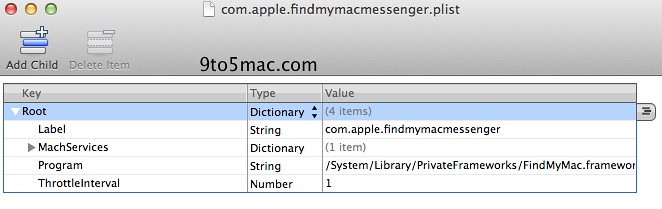
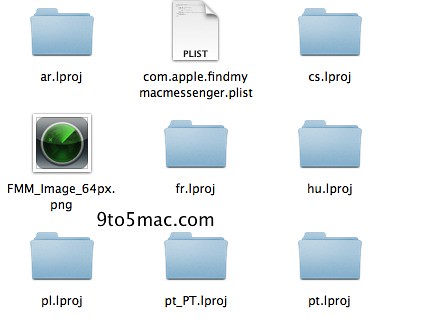
When the first developer previews of Mac OS X 10.7 Lion were released, we reported on our findings of “Find my Mac” strings hidden deep in the operating system. At that time there was no concrete evidence that Apple is bringing their Find my iPhone service to the Mac, but now there are some strong indicators in the latest Lion update, that Find my Mac is launching with Lion. The first would be the Find my Mac icon, which is reminiscent of the Find my iPhone icon.


Additionally, there is something called Find my Mac messenger. We’re not too sure what this is, but we speculate that it might be a way for the Mac’s finder to instant message with the Mac’s owner. Apple is set to unveil a revamped MobileMe, so it’s possible that Apple will throw some instant messenger client for Find my Mac into the new web interface.


*thanks 9to5Mac*

Our new Forum is now open here or on the top tabs marks Forums, please register and post.. For the latest limera1n, rubyra1n, and all tech stories, follow us on Twitter at @iphonepixelpost or @limerain_com www.iPodSets.com
- Posted using my iPhone 4

Wednesday, February 23, 2011

Mac OS X Lion to Surprise With UI Overhaul?


Apple still has a few surprises up its sleeve for Mac OS X Lion, one of which is a much anticipated UI overhaul, according to a TechCrunch report.

Well, first of all, from what we’re hearing, Apple is now using it internally. That they’re testing it shouldn’t be surprising, but it’s apparently being widely used internally. Recent statistics seem to confirm this. Looking over the TechCrunch logs, it seems that OS X 10.7 (Lion) has been seeing a surge of usage in recent weeks. After peaking in late August/early September, stats fell off a bit. But now they’re soaring again, indicating that full-scale internal testing is underway.

TechCrunch notes that because of the UI overhaul they expect Apple to begin seeding developers with beta builds of Mac OS X Lion in order to get their applications ready.

Apple has said that Mac OS X Lion will ship this summer.


*thanks iclarified*

Our new Forum is now open here or on the top tabs marks Forums, please register and post..

For the latest limera1n, rubyra1n, and all tech stories, follow us on Twitter at
@iphonepixelpost or @limerain_com
www.iPodSets.com
- Posted using my iPhone 4

Friday, February 18, 2011

Apple Seeds Mac OS X 10.6.7 Build 10J858


Apple has seeded Mac OS X 10.6.7 build 10J858 to developers for testing, according to MacRumors.

According to those familiar with the new build, Apple has added Safari to the list of areas in which developers are asked to concentrate their testing, joining Mac App Store, AirPort, Bonjour, SMB, and Graphics Drivers that had been included in previous builds. Once again, no known issues are listed in the documentation.


*thanks iclarified*

Our new Forum is now open here or on the top tabs marks Forums, please register and post..

For the latest limera1n, rubyra1n, and all tech stories, follow us on Twitter at
@iphonepixelpost or @limerain_com
www.iPodSets.com
- Posted using my iPhone 4

Tuesday, January 25, 2011

Apple Seeds New Mac OS X 10.6.7 Build to Developers


Apple has seeded a new build of Mac OS X 10.6.7 to developers for testing.

Developers are being asked to focus their testing on the Mac App Store.


*thanks iclarified*

Our new Forum is now open here or on the top tabs marks Forums, please register and post..

For the latest limera1n, rubyra1n, and all tech stories, follow us on Twitter at
@iphonepixelpost or @limerain_com
www.iPodSets.com
- Posted using my iPhone 4

Friday, January 21, 2011

Apple Seeds First Build of Mac OS X 10.6.7 to Developers


Apple has seeded the first build of Mac OS X 10.6.7 (build 10J842) to developers.

Apple lists no known issues in the documentation but asks developers to focus their testing on AirPort, Bonjour, SMB, and Graphics Drivers.


*thanks iclarified*

Our new Forum is now open here or on the top tabs marks Forums, please register and post..

For the latest limera1n, rubyra1n, and all tech stories, follow us on Twitter at
@iphonepixelpost or @limerain_com
www.iPodSets.com
- Posted using my iPhone 4

Monday, January 3, 2011

Some Rumors on Final Cut, Xserve, and Blu-ray for Mac


HardMac has learned some information from their sources that might be intriguing to those interested in Final Cut, Xserve, or Blu-ray for Mac.

First, Final Cut should be unveiled in March or early April. It will be a substantial update but may not have all the features hoped for. Apparently, two betas already exist. One for Snow Leopard and one for Lion. Some features may not be available in the Snow Leopard version because they require changes that Lion makes to QuickTime layer.

Second, the discontinuation of Xserve has been met with huge disappointment from pro users. Steve Jobs has reportedly received hundreds of letters and emails to complain. They originated from IT departments of large corporate, studios, researchers, and according from some of our sources, from Arthur D. Levinson, Genentech CEO himself, who is sitting on Apple’s administration board. It's unclear if the uproar will be enough to convince Apple that Xserve is a needed product line.

Third, Steve Jobs opinion on Blu-ray has not changed. He admitted that retrospectively he feels ashamed that Apple’s name is associated to Blu-ray, as he thinks that BD supporting associations look today more like Mafia than anything else. It seems very unlikely that Apple will add Blu-ray to its lineup. In fact, Jobs reportedly thinks that Blu-ray is the last physical media that will be used to distribute movies and videos.


*thanks iclarified*

Our new Forum is now open here or on the top tabs marks Forums, please register and post..

For the latest tech stories, follow us on Twitter at
@iphonepixelpost or @limerain_com
www.iPodSets.com
- Posted using my iPhone 4
How to Quickly Boot Your Tethered Jailbroken iPhone (Mac)

These are instructions on how to quickly boot your tethered jailbroken iPhone using RedSn0w for Mac

Step One
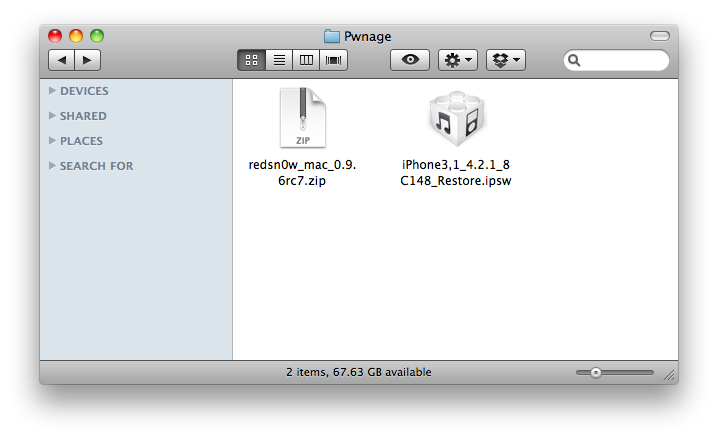
Create a Pwnage folder on your Desktop and in it place:
● RedSn0w 0.9.6rc7
● Your iPhone firmware ipsw (download here)


Step Two
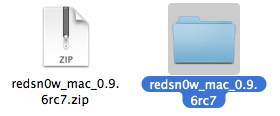
Double click the RedSn0w archive to extract it.


Step Three
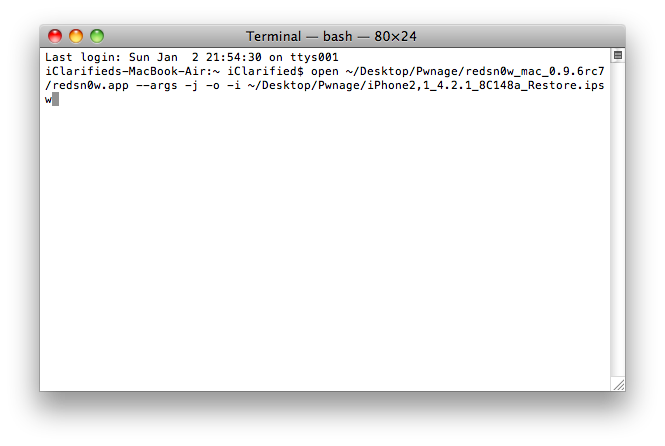
Launch Terminal from Applications:Utilities folder.


Step Four
Input the following command for devices with the new bootrom:

open ~/Desktop/Pwnage/redsn0w_mac_0.9.6rc7/redsn0w.app --args -j -i ~/Desktop/Pwnage/iPhone3,1_4.2.1_8C148_Restore.ipsw

Input the following command for devices with the old bootrom (iPod 2G, iPhone 3GS):
open ~/Desktop/Pwnage/redsn0w_mac_0.9.6rc7/redsn0w.app --args -j -o -i ~/Desktop/Pwnage/iPhone2,1_4.2.1_8C148a_Restore.ipsw

**Important: remember to change the filename to the filename of the ipsw you downloaded in Step One.


Step Five
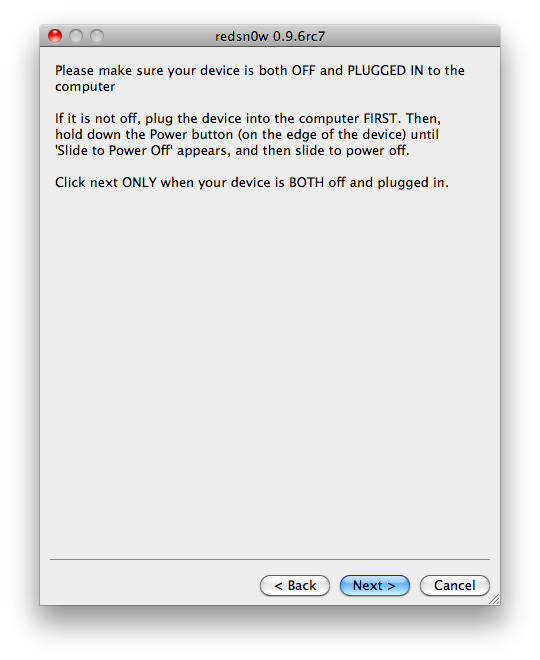
RedSn0w will now open, instruct you on placing your iPhone into DFU mode if it isn't already, and boot your device.

*thanks iclarified*

Our new Forum is now open here or on the top tabs marks Forums, please register and post..

For the latest tech stories, follow us on Twitter at
@iphonepixelpost or @limerain_com
www.iPodSets.com
- Posted using my iPhone 4